
Device Configuration
The information below is based on using firmware version 3.13 or 2.3
Step 1: Gather information for each user
Each user has a set of credentials which will be needed to configure each device. For each device that you are configuring, obtain the following:
- "SIP Address" (Address of Record)
- "SIP Password"
- "Auth Username"
- "Username"
- "Domain"
- "Outbound Proxy"
You can find this information in app.onsip.com under the Administrator tab, Users on the left, click on the User's name the device will be configured to expand the options, then choose the Phone Settings tab.
Step 2: Log into your device through a web browser
Step 3: Enter your user information from Step 1 (v. 3.13-as of Nov 2019)
VoIP Line Properties / Line 1 / Protocol Tab / SIP Section
- SIP User Name > Username
- SIP Display Name > Whatever you would like displayed
- SIP Domain Name > Domain
- Authentication User Name > Auth Username
- Authentication Password > SIP Password
- Proxy Vendor > select Cisco
- Proxy Address > sip.onsip.com (this version does not say Outbound Proxy)
- Proxy Port > 5060
Step 3: Enter your user information from Step 1 (v. 2.3- as of Jul 2015)
VoIP Line Properties / Line 1 / Protocol Tab / SIP Section
- SIP User Name > "Username"
- SIP Display Name > Whatever you would like displayed
- SIP Domain Name > "Domain"
- Authentication User Name > "Auth Username"
- Authentication Password > "SIP Password"
- Proxy Vendor > "Cisco"
- Proxy Address > "Domain"
- Outbound Proxy Address > "Outbound Proxy"
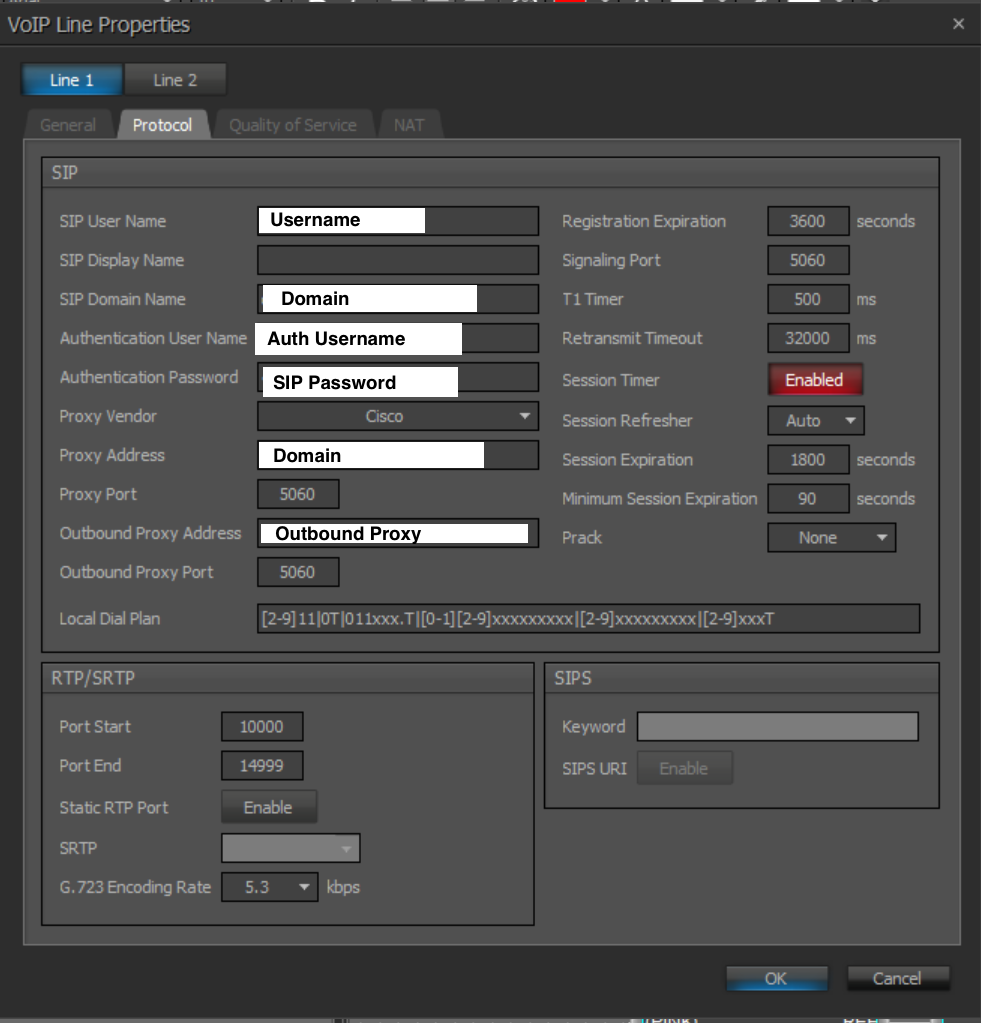
Click the "ok" button at bottom of page, save and restart device.
Step 4: Confirm that your device is registered.
In app.onsip.com as Admin, click on the Users tab. You will see an "online" notation next to each user with a registered device.
Added July 2015 / Updated Nov 2019
See our top business VoIP phone recommendations

Comments